
Be honest. You've been coding for years and you still google "how to center a div." You're not alone — we all have a list of things we look up constantly, not because we're bad developers, but because some things genuinely aren't worth memorizing.
Here's a celebration of the things developers search for every week, why we keep forgetting them, and the tools that let you skip the search entirely.
"regex for email"
Every few months, someone needs to validate an email address. Every few months, someone writes a regex for it. Every few months, that regex breaks on a perfectly valid email like user+tag@subdomain.example.co.uk.
The "simple" email regex:
^[^\s@]+@[^\s@]+\.[^\s@]+$
The actually-correct-according-to-RFC-5322 email regex is over 6,000 characters long. Nobody uses it. The real answer is: send a confirmation email.
But when you do need to test a regex, a regex tester beats squinting at backslashes in your terminal.
"json format" / "json validator"
You get a blob of minified JSON from an API response:
{"users":[{"id":1,"name":"Alice","roles":["admin","editor"],"settings":{"theme":"dark","notifications":{"email":true,"sms":false}}}]}
You could pipe it through python -m json.tool or jq . — if you remember the syntax. Or you could paste it into a JSON formatter and get readable output in one click.
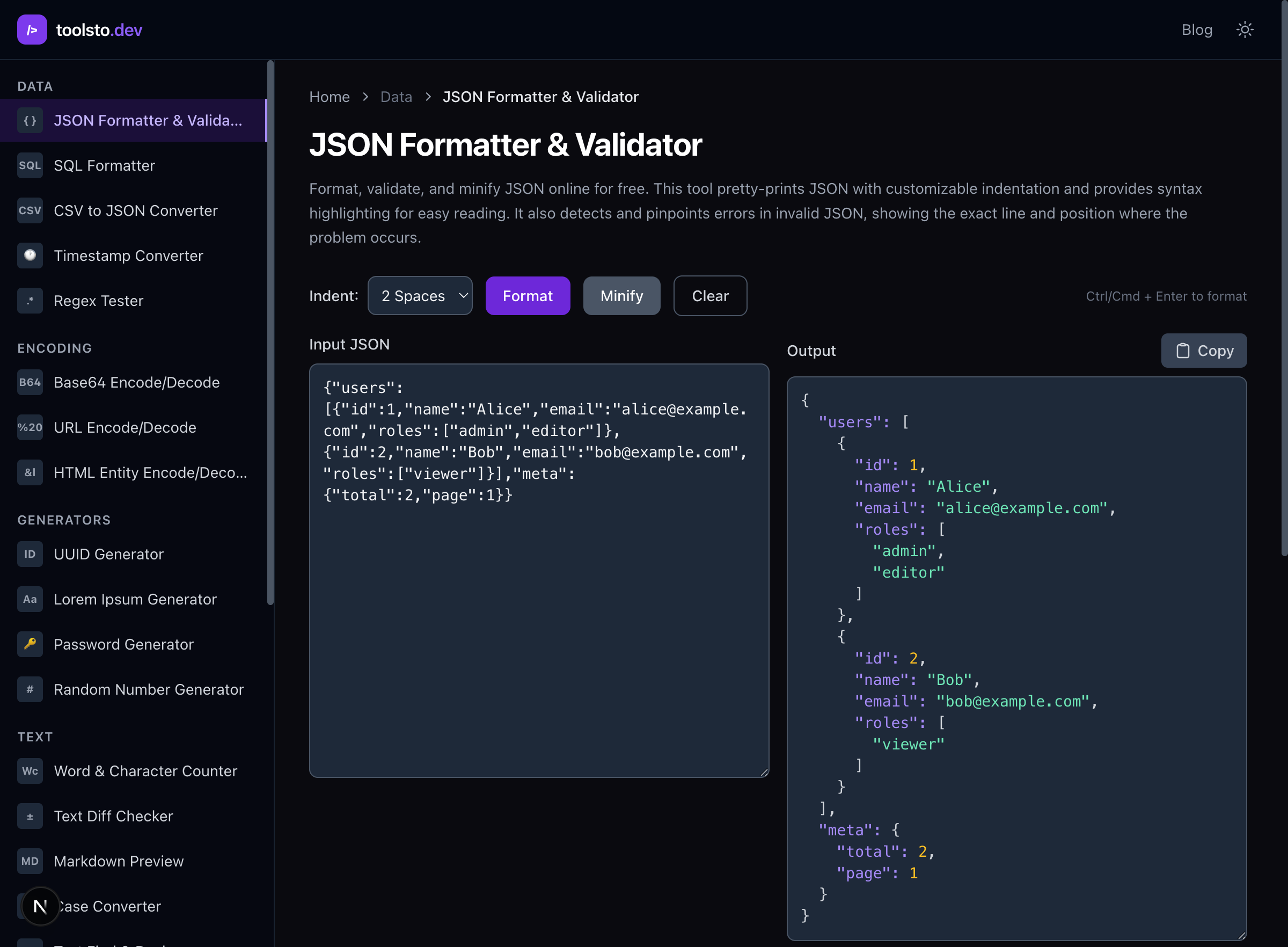
We format JSON so often it should come pre-formatted from the server. (It shouldn't. But still.)
"uuid generator"
Need a unique ID for a test fixture, mock data, or database seed? You could write crypto.randomUUID() in a Node REPL, run uuidgen in your terminal, or import a library. Or just grab one from a UUID generator.
The real question is: do you need a v4 (random) or a v7 (time-sortable)? Most developers grab v4 without thinking about it. If your IDs will be database primary keys, v7 gives you chronological ordering for free.
"base64 encode" / "base64 decode"
Someone sends you a base64-encoded string and you need to see what's inside. Or you need to encode an API key for a Basic auth header. Or you're debugging a JWT and want to peek at the payload.
echo "SGVsbG8gV29ybGQ=" | base64 -d
...if you can remember whether it's -d, -D, --decode, or -decode on your OS. Or just use a Base64 encoder/decoder and stop guessing at flags.
"unix timestamp to date"
Is 1706745600 January 31st or February 1st? Depends on your timezone. And whether the API is returning seconds or milliseconds. And whether it's UTC or local time.
Unix timestamps are great for computers and terrible for humans. A timestamp converter shows you the human-readable date instantly — in every timezone.
"url encode"
You need to pass a URL as a query parameter. Or you're building an OAuth redirect URI. Or you're debugging why an API call fails and the answer is a space that should have been %20.
Is it encodeURI or encodeURIComponent? (It's almost always encodeURIComponent.) A URL encoder handles it without the function name confusion.
"password generator"
Setting up a new service, a test account, or a database credential. You need a secure random password. You could mash your keyboard, or you could use a password generator that uses cryptographic randomness and lets you control length, symbols, and character sets.
The irony: developers build authentication systems but generate their own passwords by headbutting the keyboard.
"http status code 422" / "what does 418 mean"
You know what 200 and 404 mean. You probably know 401 and 500. But what about 422? 409? 307? 418?
(418 is "I'm a teapot." It's from an April Fool's RFC that somehow made it into actual HTTP implementations. The internet is beautiful.)
An HTTP status code reference is faster than scrolling through MDN, and you'll use it every time you're designing an API or debugging a weird response.
"chmod 755" / "chmod 644"
You know 755 means "owner can do everything, everyone else can read and execute." But which number is which? And what's the difference between 755 and 775?
7 = rwx (read + write + execute)
5 = r-x (read + execute)
4 = r-- (read only)
A chmod calculator translates between numbers and human-readable permissions without you having to do octal math in your head.
"cron expression every 5 minutes"
*/5 * * * *
Or is it 0 */5 * * *? Or 5 * * * *? Cron syntax is one of those things that looks simple until you need "every Tuesday and Thursday at 3:30 PM except in December."
A cron expression explainer tells you in plain English what a cron expression does — and more importantly, confirms it does what you THINK it does before you deploy it.
"md5 hash" / "sha256 hash"
You need to verify a file download, check a cache key, or generate a checksum. The command is right there, but the syntax is different on every platform:
# Linux
echo -n "hello" | sha256sum

# macOS
echo -n "hello" | shasum -a 256

# Or was it...
openssl dgst -sha256 <<< "hello"
A hash generator computes MD5, SHA-1, SHA-256, and SHA-512 without the cross-platform guessing game.
"html entities" / "html encode"
You need to display <script> as literal text instead of, you know, executing it. Or you need to encode an ampersand in a URL parameter that's embedded in HTML.
Is it & or & or &? (Yes.) An HTML entity encoder handles the conversion both ways.
"lorem ipsum"
You're building a UI and need placeholder text. You could type "lorem ipsum dolor sit amet" from memory and run out after about 8 words, or use a lorem ipsum generator to get exactly the number of paragraphs you need.
Fun fact: Lorem Ipsum isn't random gibberish — it's scrambled Latin from a 45 BC text by Cicero. You're using ancient Roman philosophy as placeholder text for your CRUD app.
"json to typescript"
You get a JSON response from an API and need TypeScript types for it. You could write the interface by hand, carefully matching every nested object and array type. Or you could paste the JSON into a JSON to TypeScript converter and get correct types in seconds.
This one is genuinely worth automating. Hand-writing types from JSON is error-prone, tedious, and the kind of task that makes you question your career choices.
"what is my ip"
You're configuring a firewall, allowlisting an IP for a database, or debugging why your staging server rejects your requests. You need your public IP address.
You could curl ifconfig.me or check What's My IP without leaving your browser.
"color hex to rgb" / "rgb to hex"
A designer sends you rgb(139, 92, 246) and your CSS needs hex. Or the design system uses hex and you need HSL for a transparency calculation.
A color converter translates between hex, RGB, HSL, and other formats instantly. Stop doing mental math to convert color values.
Why We Keep Googling These
These aren't things we forget because we're bad at our jobs. We forget them because:
- They're not worth memorizing. Your brain has limited space. Remembering the cron syntax for "last Friday of every month" is a waste of neurons.
- The syntax varies across platforms.
base64 -don Linux,base64 -Don macOS,[Convert]::FromBase64String()in PowerShell. - We use them just infrequently enough. You need a UUID maybe twice a week. Not enough for muscle memory.
- The details matter. Getting chmod wrong doesn't just not work — it can open security holes.
The best developers aren't the ones who memorize everything. They're the ones who know where to find answers fast and spend their memorization budget on things that actually matter — like understanding their system's architecture, their team's codebase, and when to use a 422 vs a 400.