
You need to validate an email field, extract URLs from a log file, or find every TODO comment with a username. You know regex can do it, but the syntax looks like someone fell asleep on a keyboard: ^(?:[a-zA-Z0-9._%+-]+)@(?:[a-zA-Z0-9.-]+\.[a-zA-Z]{2,})$
Regular expressions don't have to be painful. This guide covers the patterns you'll actually use in real work — with explanations that make them click, not just code to copy-paste.
The Fundamentals (In 5 Minutes)
A regex is a pattern that describes a set of strings. The engine scans text and finds matches. That's it.
Here are the building blocks you need:
Literal Characters
Most characters match themselves. The pattern error matches the string "error" — nothing fancy.
Metacharacters
These characters have special meaning:
| Character | Meaning | Example | Matches |
|---|---|---|---|
. | Any character (except newline) | h.t | "hat", "hit", "hot" |
\d | Any digit (0-9) | \d\d\d | "123", "456" |
\w | Word character (letter, digit, underscore) | \w+ | "hello", "var_1" |
\s | Whitespace (space, tab, newline) | \s+ | " ", "\t\n" |
\b | Word boundary | \bcat\b | "cat" but not "catalog" |
^ | Start of string (or line in multiline mode) | ^Error | "Error: ..." |
$ | End of string (or line) | \.js$ | "app.js" |
Uppercase versions negate: \D = non-digit, \W = non-word, \S = non-whitespace.
Quantifiers
| Quantifier | Meaning | Example | Matches |
|---|---|---|---|
* | 0 or more | ab*c | "ac", "abc", "abbc" |
+ | 1 or more | ab+c | "abc", "abbc" (not "ac") |
? | 0 or 1 | colou?r | "color", "colour" |
{3} | Exactly 3 | \d{3} | "123" |
{2,4} | Between 2 and 4 | \d{2,4} | "12", "123", "1234" |
{2,} | 2 or more | \d{2,} | "12", "12345" |
Character Classes
Square brackets define a set of characters to match:
[aeiou]       — any vowel
[a-z]         — any lowercase letter
[A-Za-z0-9]   — any alphanumeric character
[^0-9]        — anything that's NOT a digit
Groups and Alternation
Parentheses create groups. The pipe | means "or":
(cat|dog)     — "cat" or "dog"
(ab)+         — "ab", "abab", "ababab"
Escaping
To match a literal metacharacter, escape it with \:
\.    — literal dot (not "any character")
\$    — literal dollar sign
\(    — literal parenthesis
That's the entire foundation. Everything else is combining these pieces. Let's put them to work.
10 Patterns You'll Actually Use
1. Email Validation (Practical, Not RFC-Perfect)
The full RFC 5322 email regex is 6,000+ characters long. Nobody uses it. Here's what works in practice:
^[a-zA-Z0-9._%+-]+@[a-zA-Z0-9.-]+\.[a-zA-Z]{2,}$
Breaking it down:
^                    — start of string
[a-zA-Z0-9._%+-]+   — local part (letters, digits, dots, underscores, etc.)
@                    — literal @ sign
[a-zA-Z0-9.-]+      — domain name
\.                   — literal dot
[a-zA-Z]{2,}        — TLD (at least 2 letters)
$                    — end of string
Caveat: This rejects some valid but exotic addresses (like "user name"@example.com). For production, validate the format loosely with regex, then verify the address actually exists by sending a confirmation email.
2. URL Extraction
Pull URLs out of text (messages, logs, documents):
https?://[^\s<>"{}|\\^`\[\]]+
This matches http:// or https:// followed by any non-whitespace characters that aren't common delimiter characters. It's not perfect for edge cases, but it catches 99% of real URLs in text.
3. IP Address (IPv4)
\b(\d{1,3}\.){3}\d{1,3}\b
This matches the format but doesn't validate the range (it'll match 999.999.999.999). For strict validation:
\b(?:(?:25[0-5]|2[0-4]\d|[01]?\d\d?)\.){3}(?:25[0-5]|2[0-4]\d|[01]?\d\d?)\b
4. Phone Numbers (US)
Phone numbers come in many formats. This handles the most common ones:
\(?\d{3}\)?[-.\s]?\d{3}[-.\s]?\d{4}
Matches: (555) 123-4567, 555-123-4567, 555.123.4567, 5551234567
5. ISO Date (YYYY-MM-DD)
\d{4}-(?:0[1-9]|1[0-2])-(?:0[1-9]|[12]\d|3[01])
This validates the format and rejects obviously wrong months (13+) and days (32+). It won't catch February 30th — that requires logic beyond regex.
6. Hex Color Codes
#(?:[0-9a-fA-F]{6}|[0-9a-fA-F]{3})\b
Matches both #ff5733 (6-digit) and #f00 (3-digit shorthand).
7. HTML Tags
Extract or match HTML tags:
<\/?[a-zA-Z][a-zA-Z0-9]*[^>]*>
Warning: Never use regex to parse HTML for real work. Use a proper HTML parser (like DOMParser, cheerio, or BeautifulSoup). Regex is fine for quick searches in log files or simple find-and-replace operations, but it can't handle nested or malformed HTML correctly.
8. Log File Timestamps
Extract timestamps from common log formats:
\d{4}-\d{2}-\d{2}[T ]\d{2}:\d{2}:\d{2}(?:\.\d+)?(?:Z|[+-]\d{2}:?\d{2})?
Matches ISO 8601 timestamps like 2025-02-06T14:30:00.000Z and 2025-02-06 14:30:00+05:30.
9. Password Strength Validation
Check that a password meets minimum requirements (at least 8 characters, one uppercase, one lowercase, one digit):
^(?=.*[a-z])(?=.*[A-Z])(?=.*\d).{8,}$
The (?=...) syntax is a lookahead — it checks that a condition is true without consuming characters. This pattern uses three lookaheads to verify three conditions simultaneously.
10. Markdown Links
Extract links from Markdown text:
\[([^\]]+)\]\(([^)]+)\)
Captures two groups:
- Group 1: the link text (
[text]) - Group 2: the URL (
(url))
Capture Groups: The Power Feature
Parentheses don't just group — they capture. Whatever matches inside () gets stored and can be referenced later.
Named Groups
Modern regex flavors support named groups for readability:
(?<year>\d{4})-(?<month>\d{2})-(?<day>\d{2})
In JavaScript:
const match = "2025-02-06".match(/(?<year>\d{4})-(?<month>\d{2})-(?<day>\d{2})/);
console.log(match.groups.year);  // "2025"
console.log(match.groups.month); // "02"
console.log(match.groups.day);   // "06"
In Python:
import re
match = re.match(r"(?P<year>\d{4})-(?P<month>\d{2})-(?P<day>\d{2})", "2025-02-06")
print(match.group("year"))   # "2025"
Non-Capturing Groups
When you need grouping for alternation or quantifiers but don't need to capture, use (?:...):
(?:cat|dog)s?
This matches "cat", "cats", "dog", "dogs" without storing the animal name as a capture group.
Backreferences
Reference a captured group later in the same pattern:
(['"])(.*?)\1
This matches a string enclosed in matching quotes. \1 refers back to whatever the first group captured — if it captured a single quote, it matches a single quote at the end.
Lookaheads and Lookbehinds
These check for patterns without including them in the match:
| Syntax | Name | Meaning |
|---|---|---|
(?=...) | Positive lookahead | Followed by ... |
(?!...) | Negative lookahead | NOT followed by ... |
(?<=...) | Positive lookbehind | Preceded by ... |
(?<!...) | Negative lookbehind | NOT preceded by ... |
Find prices not in USD:
(?<!\$)\d+\.\d{2}
Find words followed by a comma:
\w+(?=,)
Greedy vs. Lazy Matching
By default, quantifiers are greedy — they match as much as possible.
Pattern: <.*>
Input:   <p>Hello</p>
Match:   <p>Hello</p>     ← matched everything between first < and last >
Add ? to make a quantifier lazy — it matches as little as possible:
Pattern: <.*?>
Input:   <p>Hello</p>
Match:   <p>              ← stopped at the first >
This is one of the most common gotchas. When extracting content between delimiters, you almost always want the lazy version.
Language-Specific Tips
JavaScript
// Test if a pattern matches
/^\d+$/.test("12345");  // true

// Find all matches (use the g flag)
const text = "Call 555-1234 or 555-5678";
const matches = text.match(/\d{3}-\d{4}/g);
// ["555-1234", "555-5678"]

// Replace with a function
"hello world".replace(/\b\w/g, (c) => c.toUpperCase());
// "Hello World"

// Named groups (ES2018+)
const { groups } = /(?<first>\w+)\s(?<last>\w+)/.exec("Ada Lovelace");
// groups = { first: "Ada", last: "Lovelace" }
Python
import re

# Compile for reuse
pattern = re.compile(r"\d{3}-\d{4}")

# Find all matches
re.findall(r"\d{3}-\d{4}", "Call 555-1234 or 555-5678")
# ['555-1234', '555-5678']

# Replace
re.sub(r"\b\w", lambda m: m.group().upper(), "hello world")
# 'Hello World'

# Always use raw strings (r"...") to avoid escaping issues
re.match(r"\d+", "123")  # ✅
re.match("\\d+", "123")  # works but harder to read
Command Line (grep/sed)
# Find lines containing email addresses
grep -E '[a-zA-Z0-9._%+-]+@[a-zA-Z0-9.-]+\.[a-zA-Z]{2,}' access.log

# Extract just the matches
grep -oE '\d{1,3}\.\d{1,3}\.\d{1,3}\.\d{1,3}' access.log

# Replace in files
sed -E 's/color/colour/g' style.css
When NOT to Use Regex
Regex is a tool, not a solution to everything. Don't use it for:
- Parsing HTML/XML — use a DOM parser. Regex can't handle nesting.
- Parsing JSON — use
JSON.parse(). Always. - Complex validations — if your regex is more than ~80 characters, consider writing procedural validation code instead. It'll be easier to maintain.
- Parsing CSV — use a CSV parser that handles quoted fields and escaping correctly.
- Natural language processing — regex works on patterns, not meaning.
The classic example: the email RFC compliance regex is over 6,000 characters. A simple format check plus a verification email is more reliable AND more maintainable.
Testing Your Patterns
The difference between a regex that works and one that doesn't is often one character. Build patterns incrementally:
- Start with the simplest version that matches your target
- Add complexity one piece at a time
- Test against both matching and non-matching strings
- Watch for edge cases (empty strings, very long input, special characters)
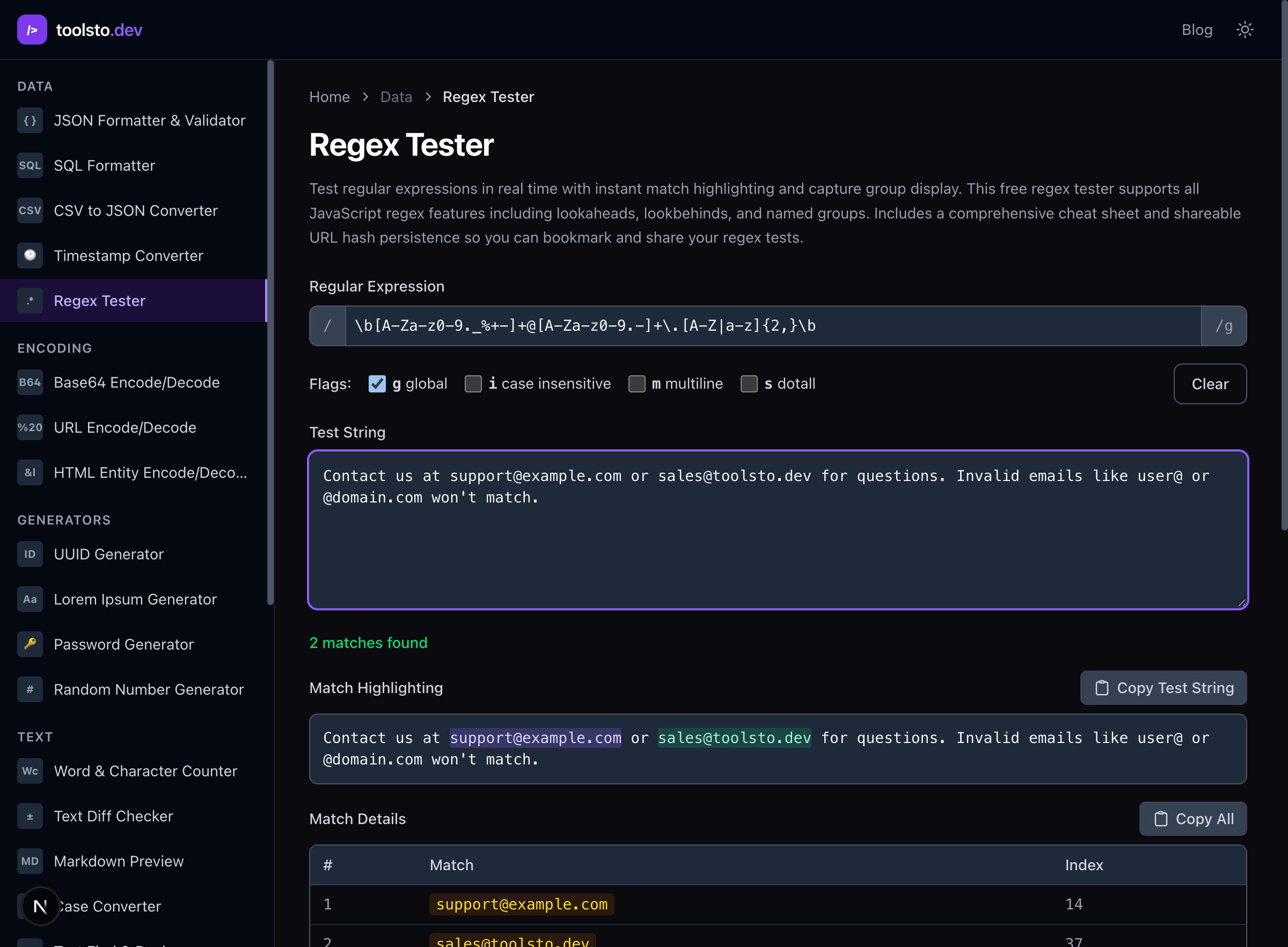
The regex tester lets you type a pattern and see matches highlighted in real time, with capture groups and match details. It's the fastest way to iterate on a pattern.
Cheat Sheet
Characters:   .  \d  \w  \s  \b  [abc]  [^abc]  [a-z]
Quantifiers:  *  +  ?  {n}  {n,m}  {n,}
Anchors:      ^  $  \b
Groups:       (...)  (?:...)  (?<name>...)
Lookaround:   (?=...)  (?!...)  (?<=...)  (?<!...)
Alternation:  |
Escaping:     \.  \*  \+  \?  \\
Flags:        g (global)  i (case-insensitive)  m (multiline)
              s (dotall)  u (unicode)
Bookmark this, paste patterns into the regex tester when you need to debug them, and remember: if your regex needs a comment explaining it, it's probably too complex.